


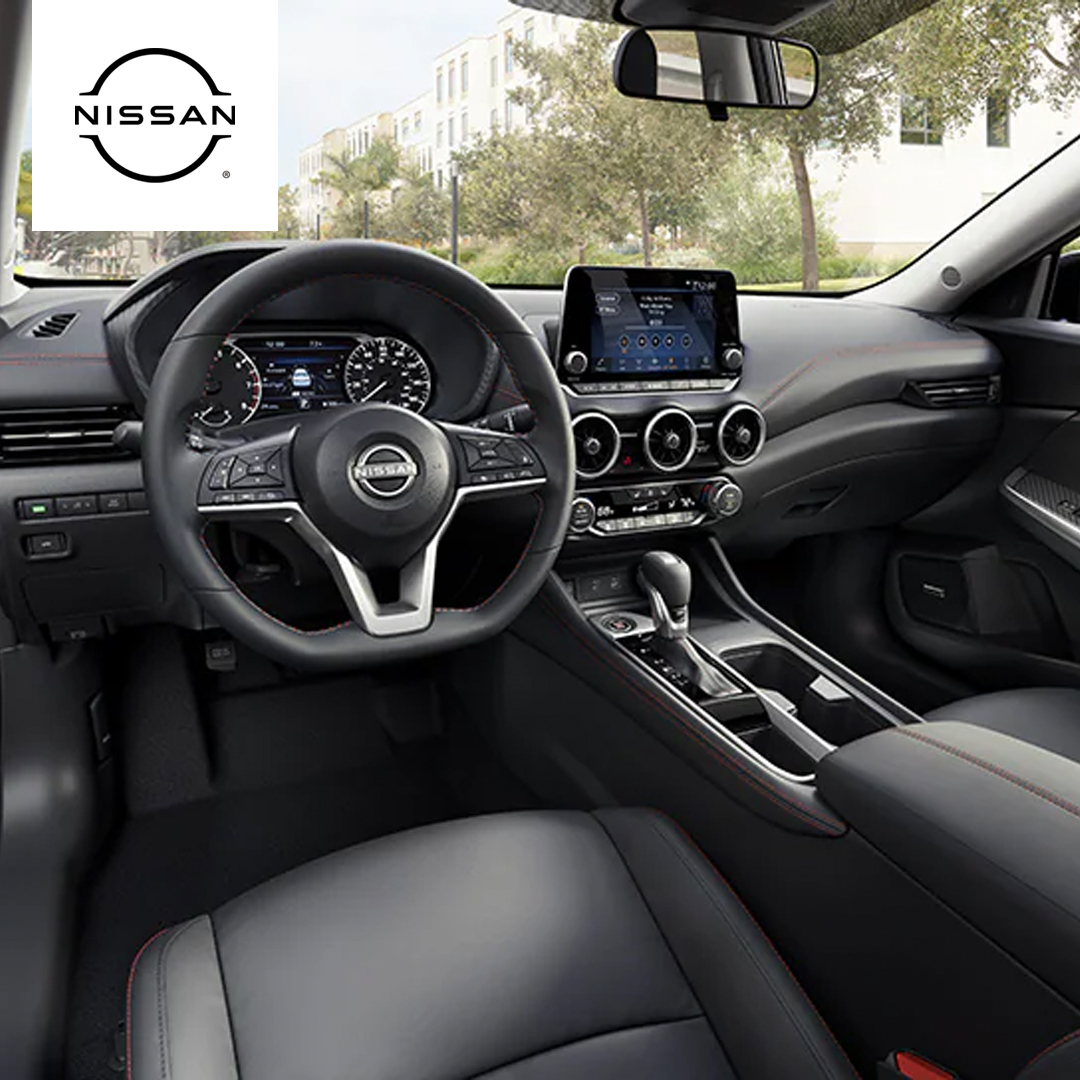
A Nissan display screen that suddenly goes dark can be more than an inconvenience. It can interrupt navigation, music, and other essential vehicle functions.
In this guide, you’ll learn the five most common reasons your Nissan’s display might fail in 2025. We’ll cover simple fixes like resetting the system or replacing a blown fuse, as well as more complex problems such as damaged units or temperature-related glitches. You’ll also find practical troubleshooting steps you can try before booking a service visit.
Whether you drive an Altima, Rogue, or Sentra, understanding these causes can save time, reduce frustration, and help avoid unnecessary repair costs. For drivers in National City, Lincoln Acres, Paradise Hills, and Alta Vista, the award-winning team at Mossy Nissan National City is ready to provide expert diagnostics, quality repairs, and the customer service that has earned us a reputation as one of the best Nissan dealers in the region.
Why Your Nissan Display Screen May Stop Working in National City
A display screen problem can affect how you drive and enjoy your Nissan. When the screen stops working, it can cause stress and slow you down. Drivers in National City often see this issue with models like the Altima, Rogue, and Sentra.
The reasons for a Nissan screen not working can range from quick fixes to repairs that take more time. It helps to know the most common causes so you can act fast.
Here are a few examples of what can make the display fail:
- A software glitch that freezes the screen
- A blown fuse that cuts power to the unit
- Loose wires that stop the signal from reaching the display
- Damage from heat, cold, or impact
If your screen stops working, start with simple checks first. Look for blown fuses or restart the system. In many cases, this can get it working again.
For larger problems, it is best to let a trained technician handle the work. This keeps your system safe and makes sure the fix lasts.
Reason 1: Software Glitches Can Disrupt Nissan Touch Screen Performance
Your Nissan’s infotainment system is much like a computer. It runs on complex software that manages navigation, audio, and connectivity features. When a glitch occurs, the system may slow down, freeze, or stop responding altogether.
Owners of models like the Altima sometimes notice the Nissan touch screen not working even though the rest of the car functions normally. This can happen when the software encounters:
- A temporary error while loading features
- A conflict after a recent update
- Difficulty communicating with connected devices
- Memory overload from too many functions running at once
These glitches are often unpredictable. They might appear once and never return, or they might happen repeatedly over time. In persistent cases, the issue may signal deeper problems within the system’s programming or hardware communication. When that happens, expert diagnostics can pinpoint the root cause and restore full display function.
Reason 2: Blown Fuses Can Shut Down the Nissan Display Screen
A Nissan display screen relies on steady electrical power to work. If that power is cut, the screen will go dark. One of the most common causes for this loss is a blown fuse.
In a Rogue, the infotainment system has its own fuse or set of fuses. These protect the screen and related components from electrical damage. When a fuse blows, it breaks the circuit and stops power from flowing. A blown fuse can result from:
- A short circuit in the wiring
- A sudden power surge
- Damage from moisture or corrosion
- Normal wear over time
Replacing a fuse is a simple fix in many cases. However, it’s important to find out why it blew. If the root cause is not addressed, the problem may return. Sometimes, multiple fuses may be linked to the same system, so a thorough check is key.
If the screen stays dark after a fuse replacement, the issue may be more complex and need a professional inspection.
Reason 3: Loose Wiring Can Cause Intermittent Screen Failures
If you notice your Nissan display not working at random times, loose wiring could be to blame. A bad connection can cause the screen to flicker, freeze, or go dark without warning.
In a Sentra, the infotainment system relies on multiple wiring harnesses to send power and data. If one of these connections loosens, even slightly, the system may cut out. The problem often gets worse when the car hits bumps or vibrates on the road.
Loose wiring may happen because of:
- Vibration over time loosening connectors
- Previous repairs that did not secure wiring
- Damage from rodents or moisture
- Wear in the wiring insulation
These issues can be tricky to track down. Sometimes the problem disappears when the car is still, making it hard to diagnose. But left unchecked, a loose connection can lead to bigger electrical issues. An inspection by a trained technician can locate and secure the affected wiring before further damage occurs.
Reason 4: Damaged Display Units Can Require Replacement
Sometimes, the problem isn’t in the wiring or software. The display unit itself can be damaged beyond repair. In those cases, replacement is the only real fix.
For example, an Altima might suffer screen damage from impact, water intrusion, or extreme heat. Even a small crack can allow moisture inside, leading to further damage. Once the internal components fail, no reset or fuse change will bring it back.
A damaged display unit may show signs like:
- Permanent black spots or lines on the screen
- Unresponsive touch areas
- Distorted or flickering images
- No power despite a working fuse
Replacing a unit is best handled by experts who know your vehicle’s system. An award winning Nissan dealer can ensure the new display is the correct fit, properly installed, and fully tested. This not only restores function but also protects the rest of your infotainment system.
Reason 5: Extreme Temperatures Can Affect Nissan Touch Screen Function
Hot summers and cold winters can both take a toll on your vehicle’s display. Touch screens rely on sensitive electronics and materials that react to changes in temperature.
In a Rogue, the screen may lag, freeze, or fail to respond after sitting in the sun for hours. In freezing weather, the display can become slow or dim until the cabin warms up.
Temperature-related issues often appear as:
- Slow or delayed touch response
- Temporary screen darkening or fading
- Sudden system restarts
- Frozen display after startup
While these problems may resolve once the cabin reaches a normal temperature, repeated exposure can shorten the life of the display. Protecting your system with shade, tint, or covered parking can help.
If the screen remains unreliable even in mild weather, it may be time for a professional check. The best Nissan dealer can test the system, confirm if temperature damage is a factor, and suggest the right fix.
How to Troubleshoot a Nissan Display Not Working Before Visiting the Dealer
If your Nissan display not working causes frustration, there are simple steps you can try first. These may solve the problem without needing a service visit.
For owners of the Sentra and other models, starting with basic checks can save time and help you understand the issue better.
Try these quick fixes:
| Step | What to Do |
| Restart the car | Turn off the engine, wait a few minutes, then start again. |
| Check the fuses | Look for blown fuses in the fuse box related to the display. |
| Inspect visible wiring | Check for loose or damaged wires behind the screen if accessible. |
| Perform a soft reset | Use the infotainment settings to reset the system, if available. |
| Disconnect the battery | As a last resort, disconnect the battery for a few minutes and reconnect it. |
If these steps don’t work, avoid trying more complex fixes yourself. Some issues need expert tools and knowledge.
When your Nissan display still does not work, contact or visit the team at Mossy Nissan National City. Our trained technicians provide expert diagnostics and reliable repairs to get your system working again.
Why Choose Mossy Nissan National City for Display Repairs
When your Nissan display needs repair, it’s important to choose a team you can trust. Mossy Nissan National City is known as a Nissan dealer with best customer service in the area. We take pride in helping drivers get back on the road with confidence.
Whether you drive an Altima or another Nissan model, our trained technicians have the skills and tools to fix your display right the first time.
Here’s what sets us apart:
| What We Offer | Why It Matters |
| Certified Nissan technicians | Expert care and accurate repairs |
| Genuine Nissan parts | Reliable replacements that fit perfectly |
| Fast diagnostics | Quick identification of problems |
| Comfortable customer experience | Friendly service and clear communication |
Choosing Mossy Nissan National City means you get more than just a fix. You get peace of mind knowing your Nissan is in good hands.
Ready to have your display checked? You can easily schedule a service appointment online for fast, expert care.
Frequently Asked Questions
Users often look for quick solutions when their Nissan’s display screen isn’t working. Finding clear answers to common questions can help avoid frustration and decide when professional help is needed.
Why is my Nissan display screen not working?
Common causes include software glitches, blown fuses, loose wiring, damaged display units, or extreme temperatures affecting the system.
How do I reset my Nissan screen?
You can try turning the car off, waiting a few minutes, then turning it back on. Some models allow a soft reset through infotainment settings. As a last resort, disconnecting the battery for a few minutes may perform a hard reset.
How to update Nissan car screen?
Check Nissan’s official website or your vehicle’s settings for available software updates. Updates can often be downloaded via USB or installed at a dealership during service.
What to do if the Nissan’s screen is not working?
Start with simple steps like restarting the car and checking fuses. If the issue continues, inspect wiring if accessible. Otherwise, contact a qualified technician or visit a trusted Nissan dealer for diagnostics and repair. If these tips don’t resolve the issue, contact or visit Mossy Nissan National City. Our expert team can diagnose and fix your display quickly and reliably.
Keep Your Nissan Running Smooth with Expert Tips and Service
If you live in National City, Lincoln Acres, Paradise Hills, or Alta Vista, we invite you to explore the wide selection of Nissan vehicles at Mossy Nissan National City. From the popular Altima and Rogue to the versatile Sentra, we have the right Nissan to fit your needs.
Keeping your Nissan running well means paying attention to regular maintenance. Understanding the right tire rotation intervals ensures even tire wear and safer driving. If you hear strange sounds, understanding what causes a whining noise when accelerating can help you catch problems early. For those who like to be prepared, knowing how to change a tire on your Nissan is a useful skill that can save time and trouble.
We encourage you to check out these helpful guides on our site. When you’re ready for expert service or want to shop our newest models, Mossy Nissan National City is your trusted local Nissan dealer.
Get Directions to Mossy Nissan National City
Disclaimer: All information is provided for general informational and entertainment purposes only. While we strive for accuracy, we cannot guarantee that all content is complete, current, or error-free. Any reliance you place on such information is strictly at your own risk. This article may include opinions and is not endorsed by, or officially affiliated with, any vehicle manufacturer or brand. Always consult official sources – such as the vehicle’s owner’s manual, authorized dealerships, or certified professionals – for the most up-to-date and personalized information.